Why photos fade
Different kinds of photos fade for different reasons.
Black and white prints are made of tiny particles of silver in gelatin. Over decades, light, humidity and pollutants in the air slowly change that silver. The print loses its deep blacks and drifts toward a flat gray or brown, often with a yellow cast from aging paper or old album pages.
Color prints are made of dyes, and dyes are less stable than silver. Each dye fades at its own speed, which is why so many prints from the 1960s and 1970s turned orange, red or magenta: the cyan dye faded first and left the warm colors behind.
Very old prints from the 1800s, like albumen prints mounted on card, fade toward a pale yellow-brown and often lose detail in the highlights first.
What speeds all of this up: sunlight, especially a photo framed in a bright room; heat, like an attic; humidity, like a basement; and acidic materials, like cheap albums, old envelopes and the self stick pages popular in the 1970s and 1980s.
What restoration brings back
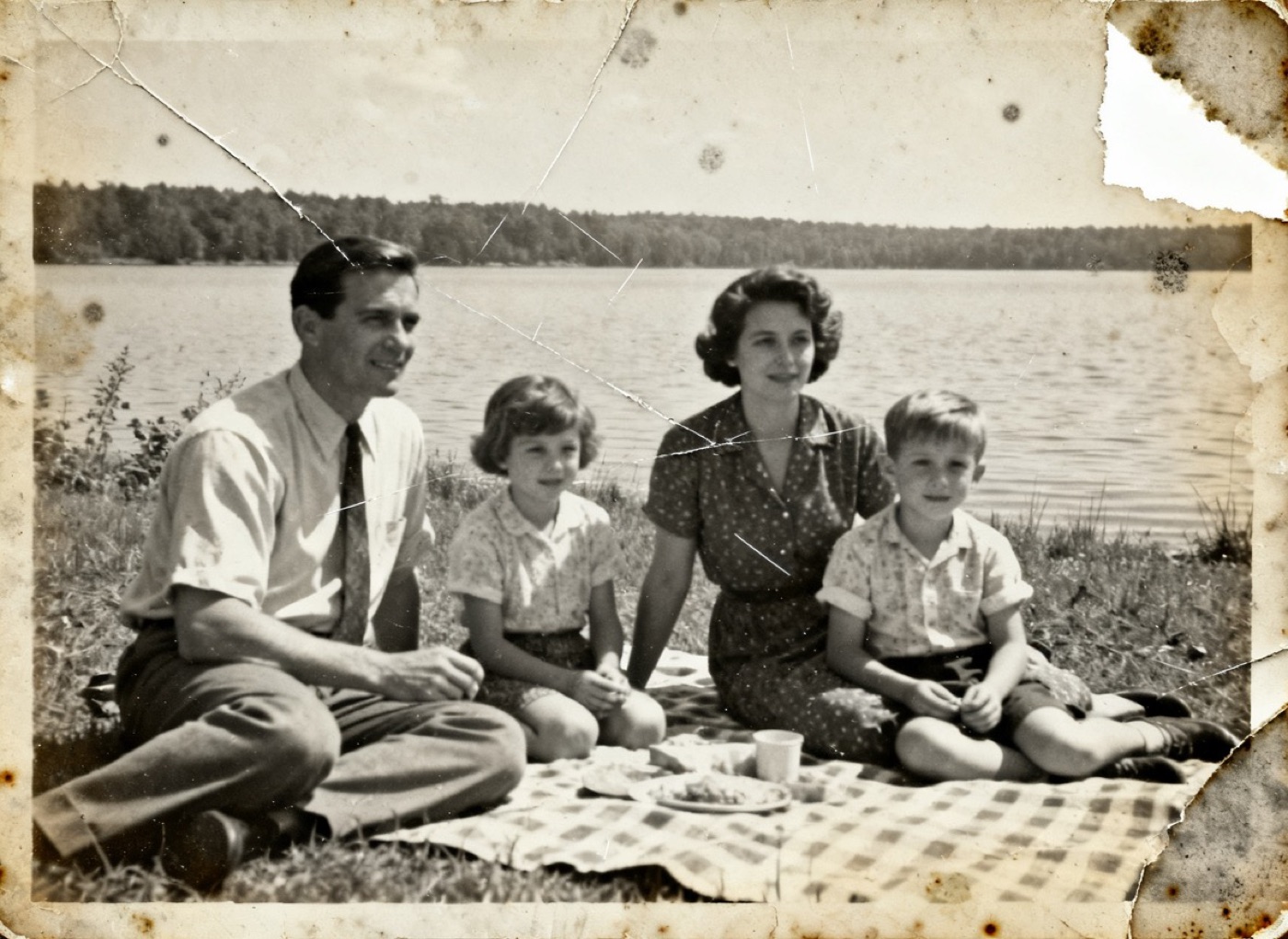
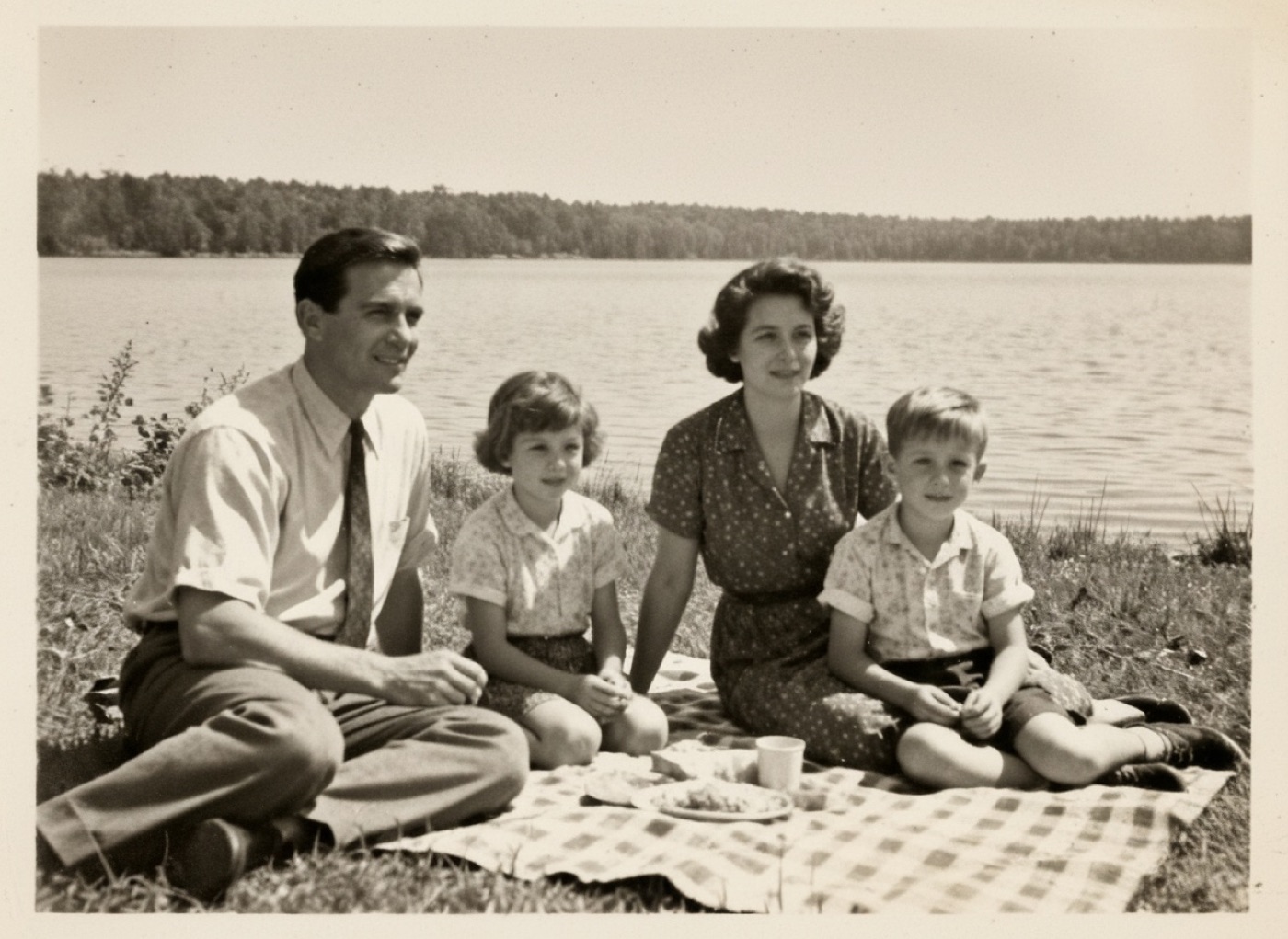
Picnic at the lake, about 1962. Torn corner rebuilt. Fading reversed. Scratches cleared.
The example above is a family picnic from about 1962, faded to almost nothing, with a torn corner and scratches. In the restored version the contrast is back, the lake and the blanket are visible again, and the faces are clear. Here is what that kind of repair does:
- Rebuilds contrast. Shadows get their depth back and highlights become clean whites again.
- Removes color casts. The yellow or brown stain of aging paper is neutralized, or a faded color print loses its orange cast.
- Recovers detail. Faces, clothing and backgrounds that were washed out become readable, because the information was faint, not gone.
- Leaves people as they were. We never change faces, expressions or who is in the photo.
What it cannot do: invent detail that is completely gone. If a part of the photo faded to pure white, with no trace of the image left, that part can only be filled in to match its surroundings. You see the result before you pay, so you can judge it yourself.
Black and white, or color?
A faded black and white photo can be restored as black and white, or restored with color added. Both are included, and the choice is yours. Many families print the black and white version, which is closest to the original, and some order both. Our guide to colorizing black and white photos explains how the colors are chosen.
A faded color print is restored in color, with the original colors brought back as closely as the print allows.
How to copy a faded photo for restoration
You do not need to send the original. A good copy is enough, and the original stays safe at home.
- Use daylight. Lay the print flat on a table near a window, out of direct sun. Daylight shows the faint tones better than lamps.
- Turn off the flash. Flash flattens the image and adds glare, which is the last thing a faded print needs.
- Hold the phone flat and parallel to the photo, directly above it, and fill the screen with the print.
- Do not edit it first. Upload the photo as it came out of the camera. Filters and auto enhance can throw away the faint detail restoration relies on.
A flatbed scanner works too. Our guide to scanning old photos covers settings for both methods.
Stop the fading from getting worse
Once you have a restored print, the original deserves a safer home. Store it in the dark, at a steady room temperature, away from attics and basements, in acid free sleeves or boxes. Do not display the original in a sunny room; frame the new print instead. Our guide to storing old photos has the details.
If the faded photo also has water marks or stains, the water damaged photos guide covers those.
Send a scan or a phone photo of the print. See the restored result before you pay.
Restore a faded photoUpdated October 8, 2026